
Managing website pages | CoreCMS guides
Website pages hold your main content. The page list manages page records, while the page builder edits the content displayed inside them.
How to use it
- Open Website pages → All pages at
/cc_admin/cms/all. - Use the available search and filters to find the page.
- Open its settings to review its title, address, template and publication status.
- Open the page itself in edit mode to change its content.
- Save and check the result while signed out.
Before you finish
A published page can be accessible by its address even when it is not in a menu. Navigation is managed separately.
Related guides
- Creating a new page
- Editing an existing page
- Creating and checking redirects
- Adding a page to navigation
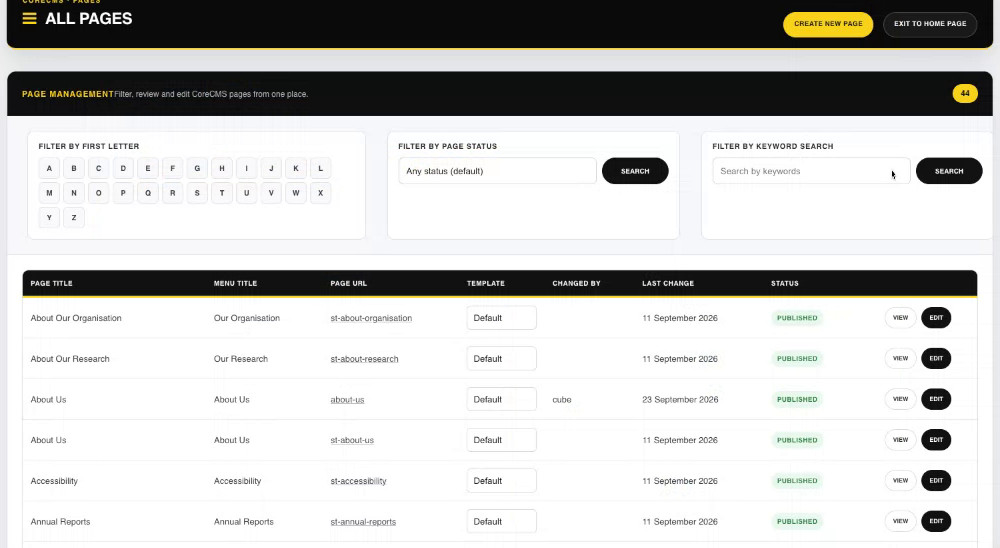
All Pages, including the page filters and record list. Select the image to view it at full size.
- Accessing CoreCMS
- Understanding the CoreCMS interface
- The administration sidebar
- Using the page builder
- Containers, rows and columns
- Adding and editing components
- Page-specific settings
- Saving and publishing changes
- Before you publish
- Desktop, tablet and mobile layouts
- Managing columns and alignment
- Saved Blocks and reusable layouts
- Buttons and linked content
- Page revisions and restoring content
- Duplicating a page
- Media Manager
- Plugins and modules
- Getting help with CoreCMS
- CoreCMS: start here
- CoreCMS Form Builder
- Website Analytics
- Managing website search
- DigiSEO: checking a page
- DigiAccess accessibility toolbar