
Renaming, moving and replacing media | CoreCMS guides
A file’s address can change when you rename or move it. CoreCMS updates recognised references during supported Media Manager operations, but other links may require attention.
How to use it
- Find the file and note where it is used.
- Rename or move it through Media Manager.
- Read the reference-update result or any warnings.
- Check pages, plugins and downloads that use the file.
- Update links in emails, external services or custom code where necessary.
Before you finish
Do not rename files directly on the server if you expect CoreCMS to update references. Keep the same public URL when a document needs replacing only if that is intentional.
Related guides
- Finding folders and media
- Creating and managing media folders
- Uploading and managing files
- Resizing, cropping and rotating images
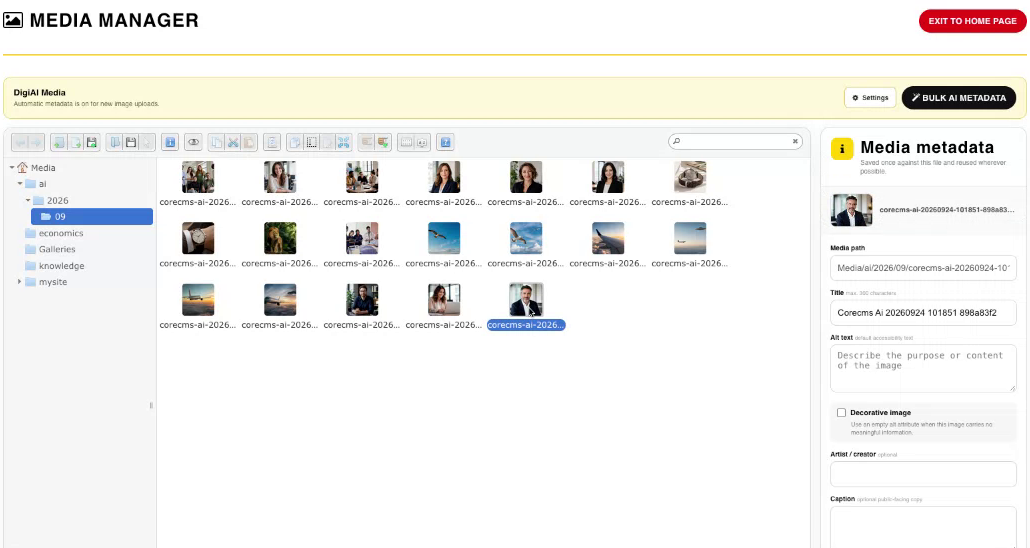
Media Manager, folders and image metadata. Select the image to view it at full size.
- Accessing CoreCMS
- Understanding the CoreCMS interface
- The administration sidebar
- Using the page builder
- Containers, rows and columns
- Adding and editing components
- Page-specific settings
- Saving and publishing changes
- Before you publish
- Desktop, tablet and mobile layouts
- Managing columns and alignment
- Saved Blocks and reusable layouts
- Buttons and linked content
- Page revisions and restoring content
- Duplicating a page
- Media Manager
- Plugins and modules
- Getting help with CoreCMS
- CoreCMS: start here
- CoreCMS Form Builder
- Website Analytics
- Managing website search
- DigiSEO: checking a page
- DigiAccess accessibility toolbar