
Creating and managing media folders | CoreCMS guides
Folders organise images and documents. Renaming or moving a folder can change the addresses of the files inside it.
How to use it
- Open the intended parent folder.
- Use New folder to create a clearly named folder.
- Use the folder’s context menu for supported actions such as rename or move.
- Review any message about updating references.
- Check affected pages after a rename or move.
Before you finish
CoreCMS can update recognised references, but external websites, emails and hard-coded theme links may still use the old address. Check a folder’s contents before deleting it.
Related guides
- Finding folders and media
- Uploading and managing files
- Resizing, cropping and rotating images
- Downloading and exporting media
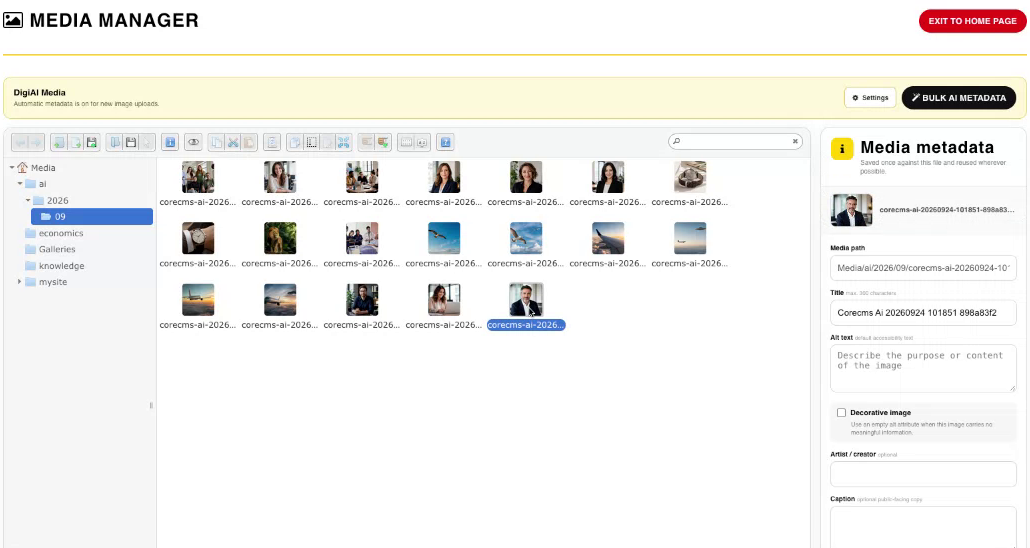
Media Manager, folders and image metadata. Select the image to view it at full size.
- Accessing CoreCMS
- Understanding the CoreCMS interface
- The administration sidebar
- Using the page builder
- Containers, rows and columns
- Adding and editing components
- Page-specific settings
- Saving and publishing changes
- Before you publish
- Desktop, tablet and mobile layouts
- Managing columns and alignment
- Saved Blocks and reusable layouts
- Buttons and linked content
- Page revisions and restoring content
- Duplicating a page
- Media Manager
- Plugins and modules
- Getting help with CoreCMS
- CoreCMS: start here
- CoreCMS Form Builder
- Website Analytics
- Managing website search
- DigiSEO: checking a page
- DigiAccess accessibility toolbar