
Removing a page from navigation | CoreCMS guides
Removing a menu item removes the link from that menu. It does not delete or unpublish the page.
How to use it
- Open the correct navigation.
- Move any child items you want to keep to another parent.
- Select the item’s delete or remove control and confirm.
- Save the navigation.
- Check that retained items still appear where expected.
Before you finish
If the page must no longer be public, change its page status separately. Review links elsewhere on the site before deleting the page itself.
Related guides
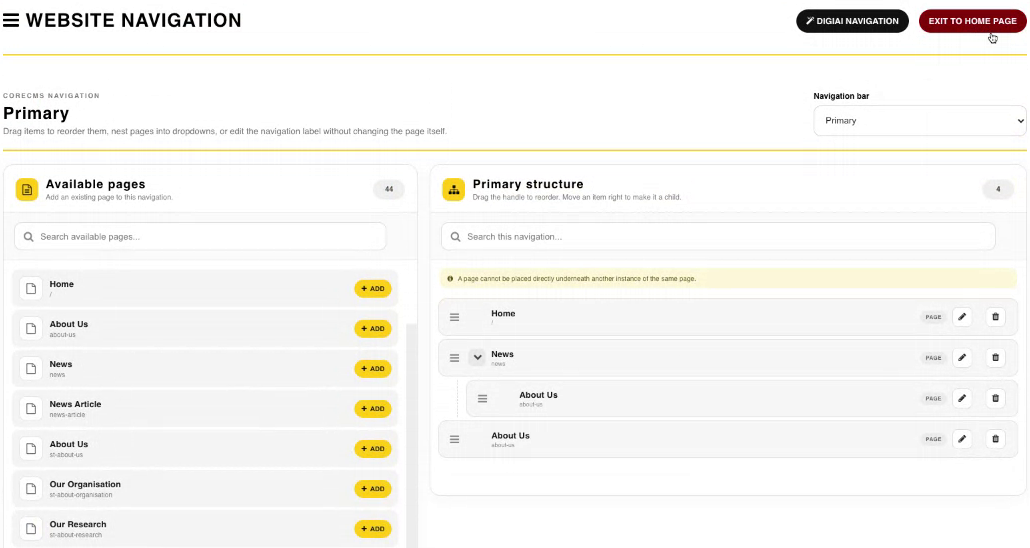
Website Navigation, available pages and the menu structure. Select the image to view it at full size.
- Accessing CoreCMS
- Understanding the CoreCMS interface
- The administration sidebar
- Using the page builder
- Containers, rows and columns
- Adding and editing components
- Page-specific settings
- Saving and publishing changes
- Before you publish
- Desktop, tablet and mobile layouts
- Managing columns and alignment
- Saved Blocks and reusable layouts
- Buttons and linked content
- Page revisions and restoring content
- Duplicating a page
- Media Manager
- Plugins and modules
- Getting help with CoreCMS
- CoreCMS: start here
- CoreCMS Form Builder
- Website Analytics
- Managing website search
- DigiSEO: checking a page
- DigiAccess accessibility toolbar