
Using the page builder | CoreCMS guides
The page builder arranges content into containers, rows, columns and components. Select the element you want to change, then use its toolbar or settings panel.
How to use it
- Open the page in edit mode.
- Add a container or select an existing one.
- Add components to a column using the available component chooser.
- Select the correct element before changing its settings.
- Check Desktop, Tablet and Mobile views.
- Save your changes and check the public page.
Before you finish
A container controls a larger section; a component controls one content item. Nested elements have separate settings. Click outside a settings panel to return to the page where that behaviour is available.
Related guides
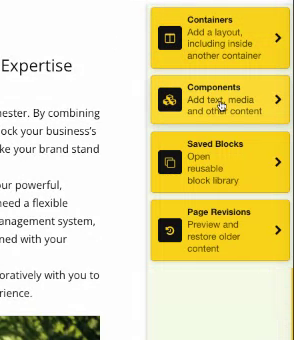
Page builder options for Containers, Components, Saved Blocks and Page Revisions. Select the image to view it at full size.
- Accessing CoreCMS
- Understanding the CoreCMS interface
- The administration sidebar
- Using the page builder
- Containers, rows and columns
- Adding and editing components
- Page-specific settings
- Saving and publishing changes
- Before you publish
- Desktop, tablet and mobile layouts
- Managing columns and alignment
- Saved Blocks and reusable layouts
- Buttons and linked content
- Page revisions and restoring content
- Duplicating a page
- Media Manager
- Plugins and modules
- Getting help with CoreCMS
- CoreCMS: start here
- CoreCMS Form Builder
- Website Analytics
- Managing website search
- DigiSEO: checking a page
- DigiAccess accessibility toolbar