
CoreCMS Form Builder | CoreCMS guides
CoreCMS includes a visual form builder for creating forms and managing their submission settings. This guide covers the forms inside CoreCMS, rather than the separate CoreForms product.
How to use it
- Open Forms from the administration menu.
- Choose Create a new form and enter a descriptive title.
- Open the form editor and build the form structure with the available components.
- Configure recipients, email subject and submission messages.
- Choose the form status and submission storage policy.
- Save, place the shortcode on a page and submit a test.
Before you finish
Existing legacy forms can remain in the form list. Their edit options can differ from forms created with the current visual builder.
Related guides
- Form fields and validation
- Conditional fields in forms
- Form notifications and custom emails
- Submission storage and retention
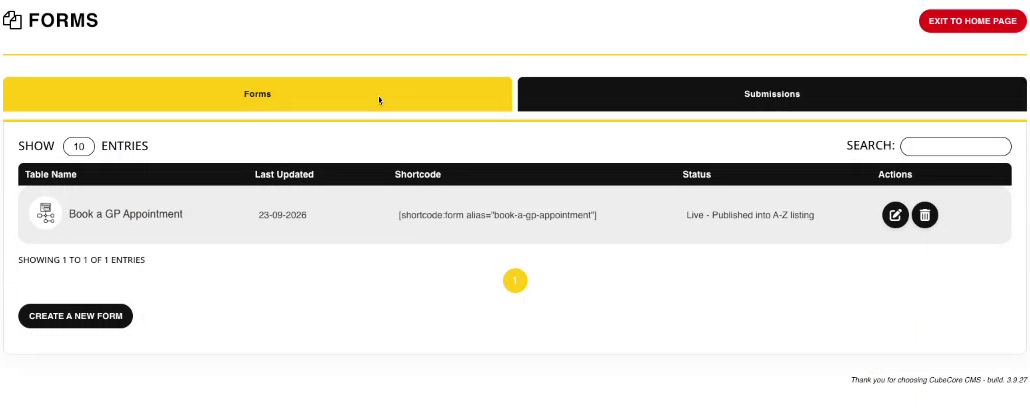
The Forms list with shortcode and status columns. Select the image to view it at full size.
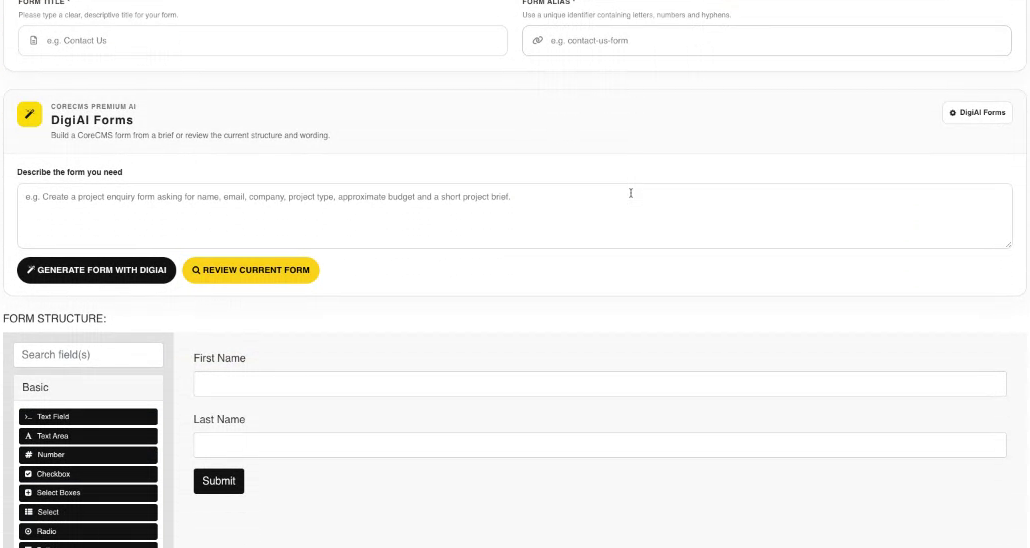
Form structure and the visual component palette. Select the image to view it at full size.
- Accessing CoreCMS
- Understanding the CoreCMS interface
- The administration sidebar
- Using the page builder
- Containers, rows and columns
- Adding and editing components
- Page-specific settings
- Saving and publishing changes
- Before you publish
- Desktop, tablet and mobile layouts
- Managing columns and alignment
- Saved Blocks and reusable layouts
- Buttons and linked content
- Page revisions and restoring content
- Duplicating a page
- Media Manager
- Plugins and modules
- Getting help with CoreCMS
- CoreCMS: start here
- CoreCMS Form Builder
- Website Analytics
- Managing website search
- DigiSEO: checking a page
- DigiAccess accessibility toolbar