
Managing website search | CoreCMS guides
CoreCMS Search builds an index of published pages and supported plugin content. It ranks matches using the indexed information and your search settings.
How to use it
- Open Settings → Site Search at
/cc_admin/settings/search. - Review the content sources included in search.
- Use Test your search with phrases visitors are likely to use.
- Review relevance settings and matching behaviour only where results need improvement.
- Save changes and test the public search box.
Before you finish
Website search and external search engines are separate systems. A plugin must expose suitable content to the index before its records can appear in site search.
Related guides
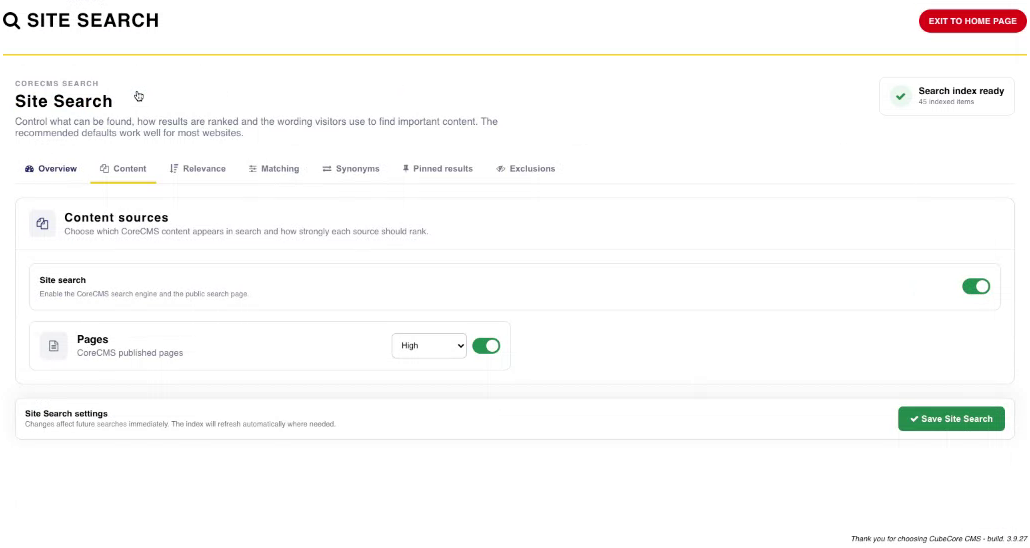
Site Search content sources. Select the image to view it at full size.
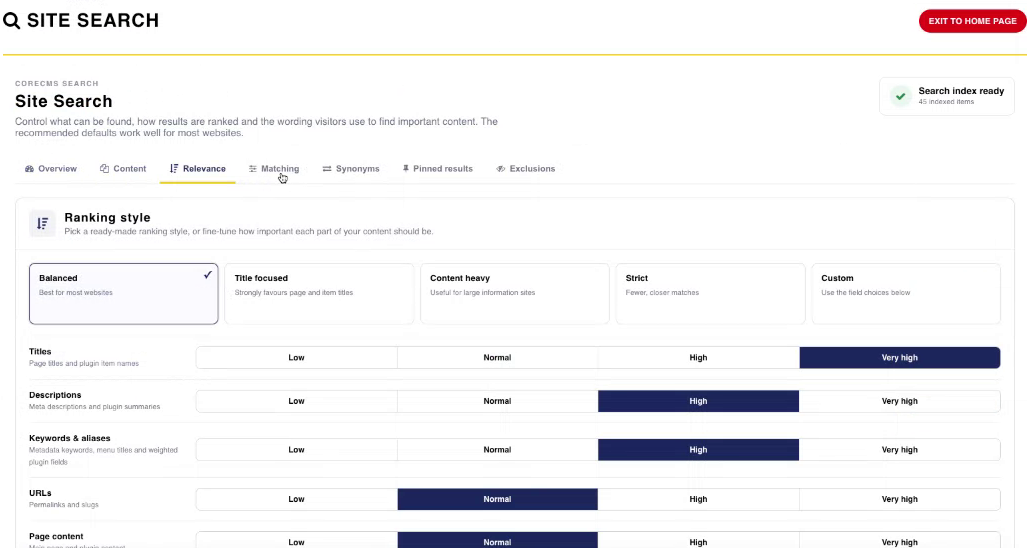
Site Search ranking controls. Select the image to view it at full size.
- Accessing CoreCMS
- Understanding the CoreCMS interface
- The administration sidebar
- Using the page builder
- Containers, rows and columns
- Adding and editing components
- Page-specific settings
- Saving and publishing changes
- Before you publish
- Desktop, tablet and mobile layouts
- Managing columns and alignment
- Saved Blocks and reusable layouts
- Buttons and linked content
- Page revisions and restoring content
- Duplicating a page
- Media Manager
- Plugins and modules
- Getting help with CoreCMS
- CoreCMS: start here
- CoreCMS Form Builder
- Website Analytics
- Managing website search
- DigiSEO: checking a page
- DigiAccess accessibility toolbar