
CoreCMS updates | CoreCMS guides
CoreCMS can receive approved releases through CoreCMS Hub. Depending on the installation, updates are started manually or initiated when an authorised user next signs in.
How to use it
- Open the Updates screen.
- Check the installed and available versions.
- Choose Check for updates and then Prepare Update where offered.
- Review the preparation checks, including any local-file warnings.
- Apply the update only when the site is ready.
- Wait for completion and test pages, forms and administration tools.
Before you finish
Arrange a current file and database backup before updating. Ask Digitalogy to handle older installations that need the legacy upgrade process. Development and preview releases are not automatically suitable for a live site.
Related guides
- CMS accounts and permissions
- Adding a CMS user
- Managing an existing CMS user
- The administration sidebar
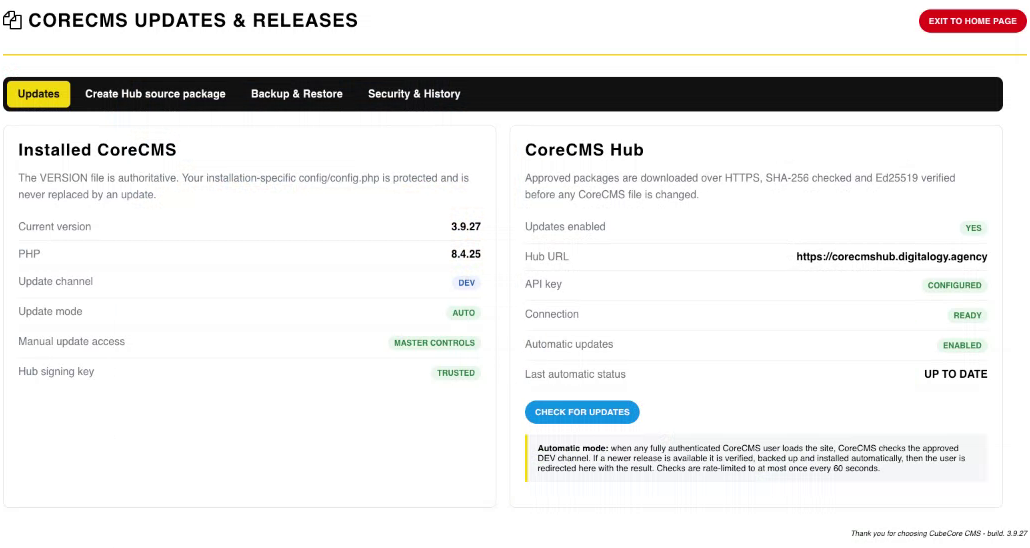
CoreCMS Updates & Releases. Select the image to view it at full size.
- Accessing CoreCMS
- Understanding the CoreCMS interface
- The administration sidebar
- Using the page builder
- Containers, rows and columns
- Adding and editing components
- Page-specific settings
- Saving and publishing changes
- Before you publish
- Desktop, tablet and mobile layouts
- Managing columns and alignment
- Saved Blocks and reusable layouts
- Buttons and linked content
- Page revisions and restoring content
- Duplicating a page
- Media Manager
- Plugins and modules
- Getting help with CoreCMS
- CoreCMS: start here
- CoreCMS Form Builder
- Website Analytics
- Managing website search
- DigiSEO: checking a page
- DigiAccess accessibility toolbar