
Adding an external navigation link | CoreCMS guides
Use an external or virtual link when the destination is not one of the available CMS pages.
How to use it
- Open Website navigation and locate Add external page.
- Enter the full destination URL, including
https://for another website. - Enter a clear title for the menu item.
- Add it to the required menu location and save.
- Test the link and any new-window behaviour offered by your theme.
Before you finish
For a CMS page, prefer the page picker where possible. Check external links periodically because the destination may change.
Related guides
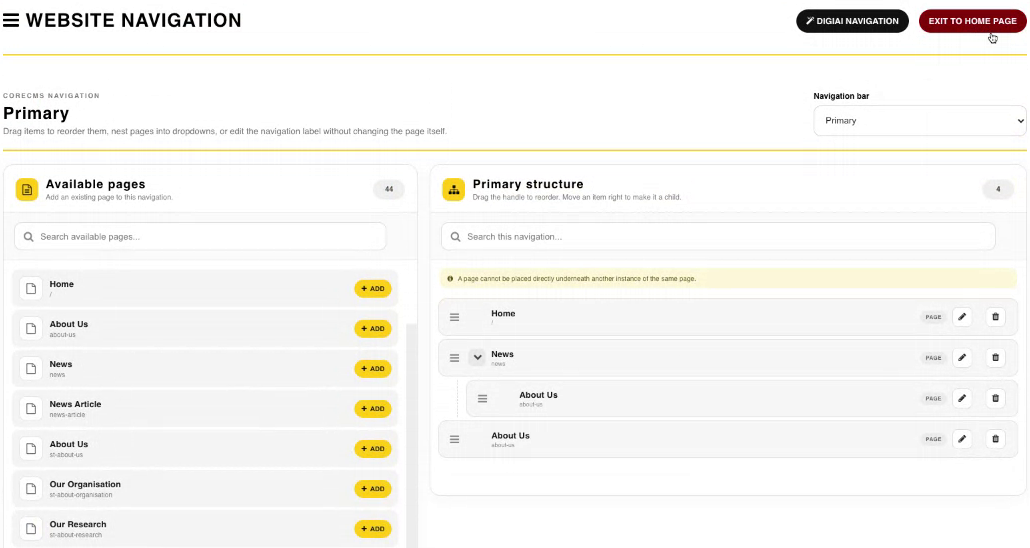
Website Navigation, available pages and the menu structure. Select the image to view it at full size.
- Accessing CoreCMS
- Understanding the CoreCMS interface
- The administration sidebar
- Using the page builder
- Containers, rows and columns
- Adding and editing components
- Page-specific settings
- Saving and publishing changes
- Before you publish
- Desktop, tablet and mobile layouts
- Managing columns and alignment
- Saved Blocks and reusable layouts
- Buttons and linked content
- Page revisions and restoring content
- Duplicating a page
- Media Manager
- Plugins and modules
- Getting help with CoreCMS
- CoreCMS: start here
- CoreCMS Form Builder
- Website Analytics
- Managing website search
- DigiSEO: checking a page
- DigiAccess accessibility toolbar