
Understanding the CoreCMS interface | CoreCMS guides
CoreCMS combines administration screens with an editor on the website itself. Administration screens manage records and settings; the page builder manages the visible content of editable page sections.
How to use it
- Use Website pages to find, create or edit a page.
- Use Website navigation to manage menu labels and order.
- Use Media to upload and organise images and documents.
- Open the page editor to change containers, columns and components.
- Use the save control for the screen you are editing, then check the public result.
Before you finish
A page title, its menu label and its SEO title serve different purposes. Editing one does not mean you have changed all three. Some panels close when you click outside them.
Related guides
- Accessing CoreCMS
- Signing in to CoreCMS
- Account security and access restrictions
- Getting help with CoreCMS
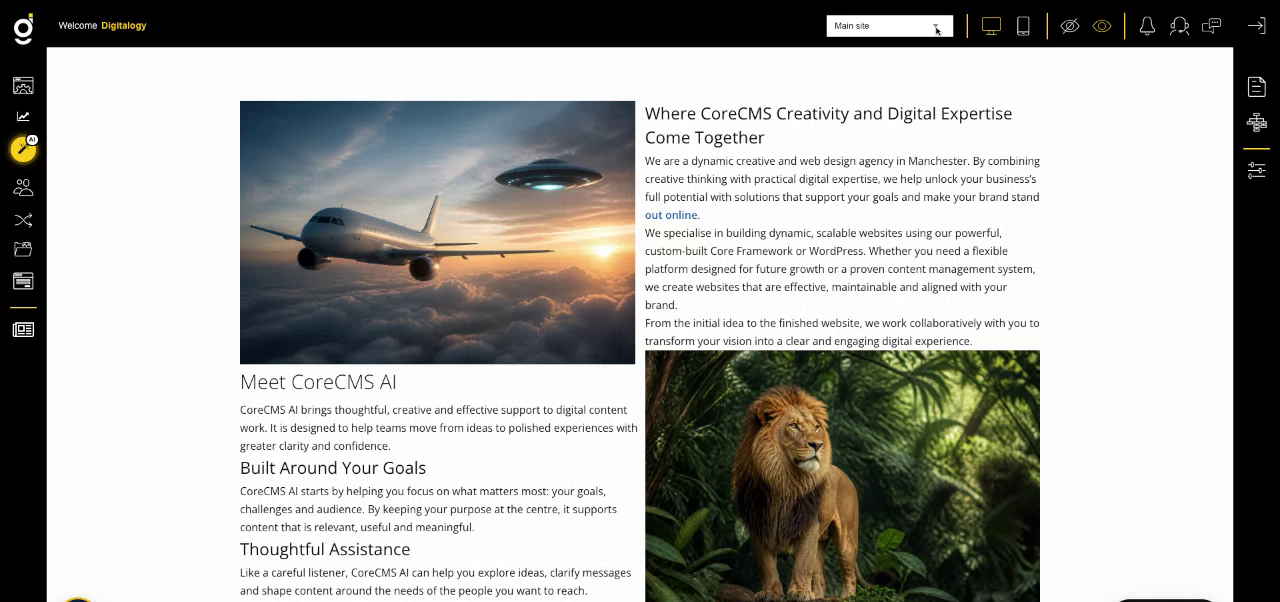
CoreCMS administration controls around the website. Select the image to view it at full size.
- Accessing CoreCMS
- Understanding the CoreCMS interface
- The administration sidebar
- Using the page builder
- Containers, rows and columns
- Adding and editing components
- Page-specific settings
- Saving and publishing changes
- Before you publish
- Desktop, tablet and mobile layouts
- Managing columns and alignment
- Saved Blocks and reusable layouts
- Buttons and linked content
- Page revisions and restoring content
- Duplicating a page
- Media Manager
- Plugins and modules
- Getting help with CoreCMS
- CoreCMS: start here
- CoreCMS Form Builder
- Website Analytics
- Managing website search
- DigiSEO: checking a page
- DigiAccess accessibility toolbar