
Website Analytics | CoreCMS guides
CoreCMS Analytics reports on visits, content, traffic sources, devices, searches and recorded interactions. Data is collected by the website and stored in its CoreCMS database.
How to use it
- Open Analytics at
/cc_admin/analytics. - Choose From and To dates, or use Today, 7 days, 30 days or 90 days.
- Select Apply.
- Review the overview before opening the detailed reporting tabs.
- Use the results to identify pages or journeys worth improving.
Before you finish
Analytics starts from the data your site has collected; it cannot recreate visits from before tracking was enabled. Visitor counts are estimates and may differ from other analytics products.
Related guides
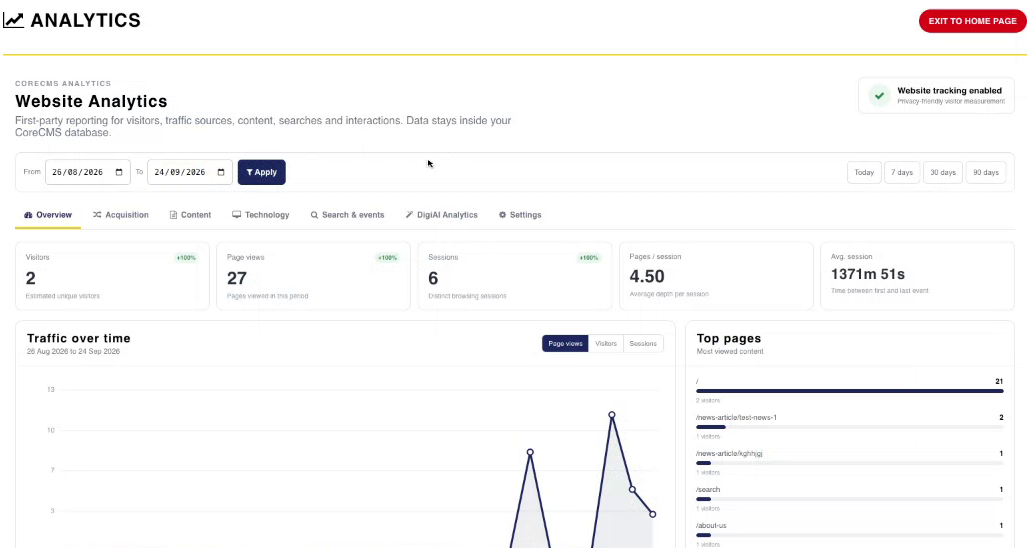
Website Analytics overview and date controls. Select the image to view it at full size.
- Accessing CoreCMS
- Understanding the CoreCMS interface
- The administration sidebar
- Using the page builder
- Containers, rows and columns
- Adding and editing components
- Page-specific settings
- Saving and publishing changes
- Before you publish
- Desktop, tablet and mobile layouts
- Managing columns and alignment
- Saved Blocks and reusable layouts
- Buttons and linked content
- Page revisions and restoring content
- Duplicating a page
- Media Manager
- Plugins and modules
- Getting help with CoreCMS
- CoreCMS: start here
- CoreCMS Form Builder
- Website Analytics
- Managing website search
- DigiSEO: checking a page
- DigiAccess accessibility toolbar