
The administration sidebar | CoreCMS guides
The sidebar provides access to the tools enabled for your account and website. Current CoreCMS installations can include pages, navigation, media, forms, analytics, accounts, settings and site-specific modules.
How to use it
- Open the administration sidebar.
- Choose the relevant section and action, such as viewing records or creating a page.
- Check the current site if a site selector is present.
- Use Exit to home page to return from an administration screen to the website.
Before you finish
The menu adapts to permissions and installed features. A tool shown in this guide may not be enabled for your site.
Related guides
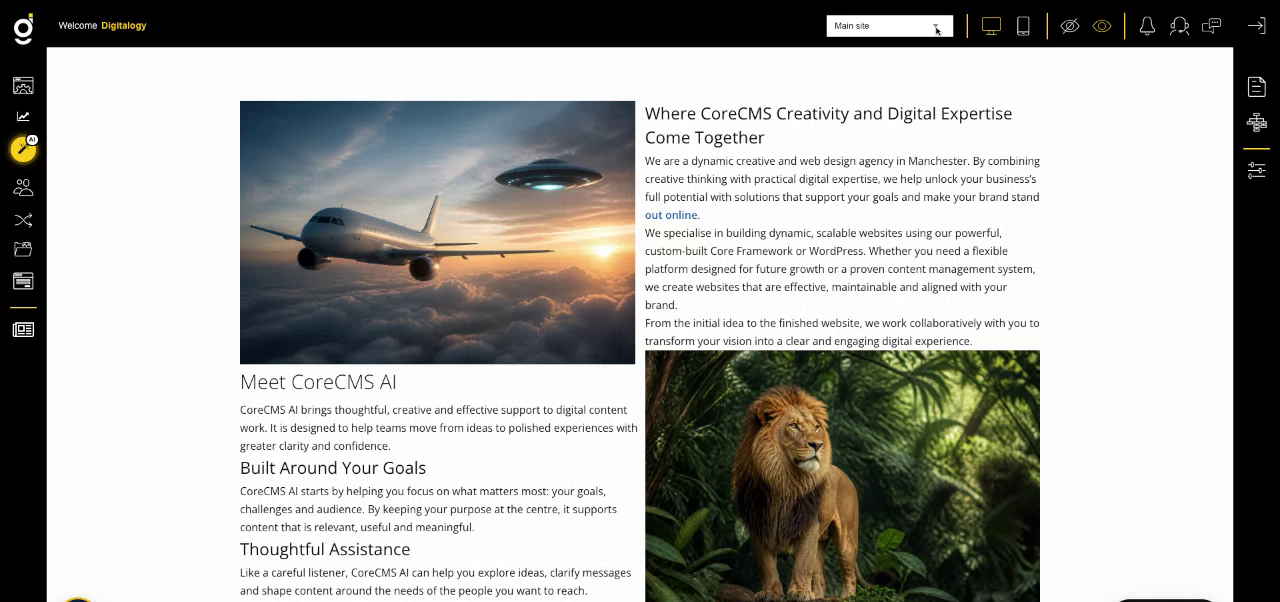
CoreCMS administration controls around the website. Select the image to view it at full size.
- Accessing CoreCMS
- Understanding the CoreCMS interface
- The administration sidebar
- Using the page builder
- Containers, rows and columns
- Adding and editing components
- Page-specific settings
- Saving and publishing changes
- Before you publish
- Desktop, tablet and mobile layouts
- Managing columns and alignment
- Saved Blocks and reusable layouts
- Buttons and linked content
- Page revisions and restoring content
- Duplicating a page
- Media Manager
- Plugins and modules
- Getting help with CoreCMS
- CoreCMS: start here
- CoreCMS Form Builder
- Website Analytics
- Managing website search
- DigiSEO: checking a page
- DigiAccess accessibility toolbar