
Page revisions and restoring content | CoreCMS guides
Page revisions retain snapshots that can help you recover an earlier page state. Availability depends on the installed version and your permissions.
How to use it
- Open the page’s revision history or Time Machine control.
- Review the available dates, authors and revision details.
- Select the earlier version you need.
- Check the preview or recorded content before restoring.
- Restore only when you are ready to replace the current state.
- Review page settings, content and public output after restoration.
Before you finish
A revision restore is not a full website restore. It cannot recover a deleted media file from the server. Keep current content separately if you may need it again.
Related guides
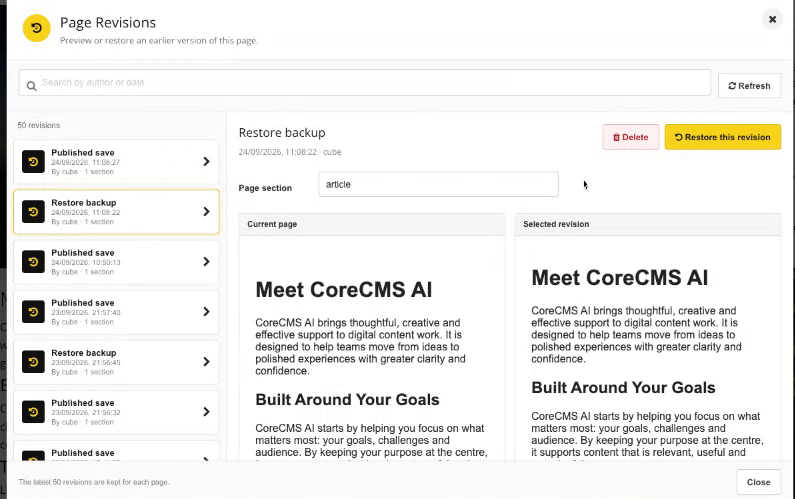
Page Revisions with a selected saved version. Select the image to view it at full size.
- Accessing CoreCMS
- Understanding the CoreCMS interface
- The administration sidebar
- Using the page builder
- Containers, rows and columns
- Adding and editing components
- Page-specific settings
- Saving and publishing changes
- Before you publish
- Desktop, tablet and mobile layouts
- Managing columns and alignment
- Saved Blocks and reusable layouts
- Buttons and linked content
- Page revisions and restoring content
- Duplicating a page
- Media Manager
- Plugins and modules
- Getting help with CoreCMS
- CoreCMS: start here
- CoreCMS Form Builder
- Website Analytics
- Managing website search
- DigiSEO: checking a page
- DigiAccess accessibility toolbar