
Uploading and managing files | CoreCMS guides
Upload images and documents through Media Manager so you can select them from pages and plugin fields. Accepted formats and upload limits depend on the server configuration.
How to use it
- Open the destination folder.
- Use Upload or drag files into the upload area where supported.
- Wait for the upload to finish.
- Select the file and review its name and metadata.
- Use the context menu for preview, download, rename, move or other supported actions.
- Insert the file through the relevant page or plugin media picker.
Before you finish
Do not treat the media folder as private storage. Before deleting or replacing a file, check where it is used. An upload restriction is not a guarantee that every accepted file has been malware-scanned.
Related guides
- Finding folders and media
- Creating and managing media folders
- Resizing, cropping and rotating images
- Downloading and exporting media
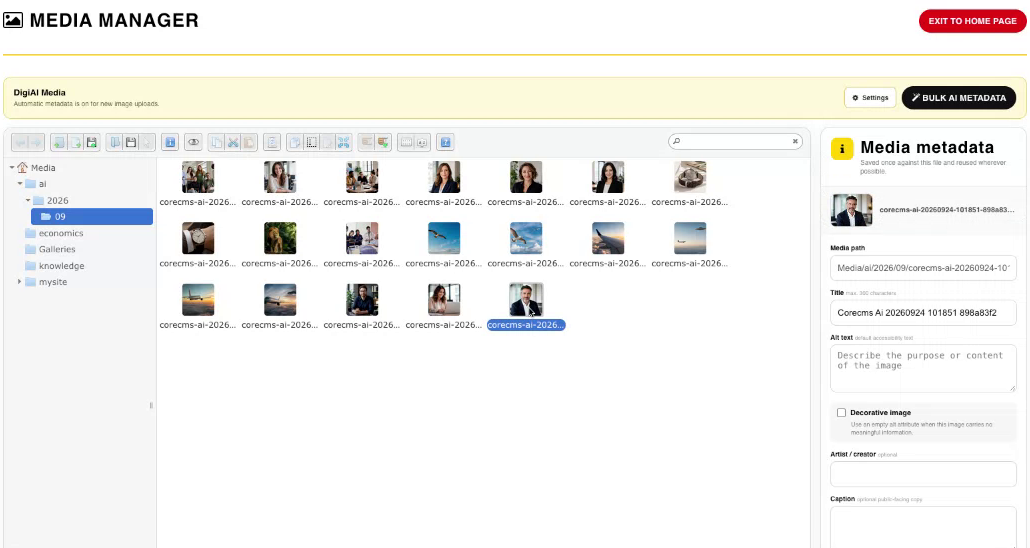
Media Manager, folders and image metadata. Select the image to view it at full size.
- Accessing CoreCMS
- Understanding the CoreCMS interface
- The administration sidebar
- Using the page builder
- Containers, rows and columns
- Adding and editing components
- Page-specific settings
- Saving and publishing changes
- Before you publish
- Desktop, tablet and mobile layouts
- Managing columns and alignment
- Saved Blocks and reusable layouts
- Buttons and linked content
- Page revisions and restoring content
- Duplicating a page
- Media Manager
- Plugins and modules
- Getting help with CoreCMS
- CoreCMS: start here
- CoreCMS Form Builder
- Website Analytics
- Managing website search
- DigiSEO: checking a page
- DigiAccess accessibility toolbar