
Backups, rollback and recovery | CoreCMS guides
A full recovery may need both website files and a matching database backup. CoreCMS update rollback and page revisions solve different problems.
How to use it
- Before an update, confirm that a usable file and database backup exists.
- If an update fails, read the update result and any rollback information.
- Use the offered restore or rollback action only after identifying the intended backup.
- Ask Digitalogy to investigate incomplete migrations or server errors.
- After recovery, test forms, uploaded files, page content and sign-in.
Before you finish
Restoring older data can remove changes made after that backup. A page revision cannot restore the whole site, and a file-only backup cannot recover database records.
Related guides
- CMS accounts and permissions
- Adding a CMS user
- Managing an existing CMS user
- The administration sidebar
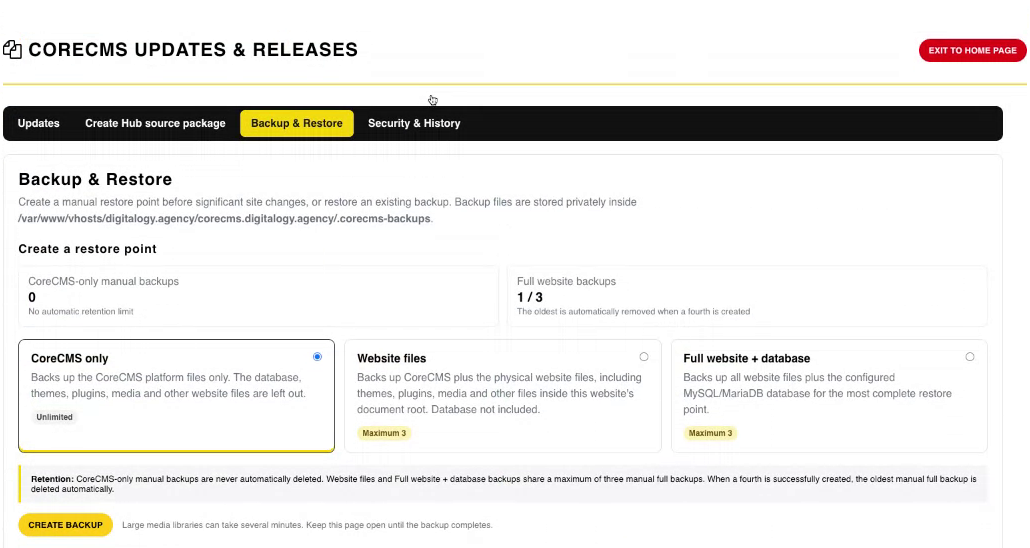
Backup & Restore options. Select the image to view it at full size.
- Accessing CoreCMS
- Understanding the CoreCMS interface
- The administration sidebar
- Using the page builder
- Containers, rows and columns
- Adding and editing components
- Page-specific settings
- Saving and publishing changes
- Before you publish
- Desktop, tablet and mobile layouts
- Managing columns and alignment
- Saved Blocks and reusable layouts
- Buttons and linked content
- Page revisions and restoring content
- Duplicating a page
- Media Manager
- Plugins and modules
- Getting help with CoreCMS
- CoreCMS: start here
- CoreCMS Form Builder
- Website Analytics
- Managing website search
- DigiSEO: checking a page
- DigiAccess accessibility toolbar