
Form notifications and custom emails | CoreCMS guides
Each form can define its recipient and subject. You can use the automatic submission email or build a custom email body.
How to use it
- Open the form editor’s Email & submission settings.
- Set Form to and Mail subject.
- Choose whether file uploads should be attached where supported.
- Enable Build a custom email if you need a tailored body.
- Use the supplied field tokens and form tokens, such as
[form_title]or[all_fields]. - Choose Visual HTML or Raw/XML plain text as appropriate.
- Save and send a test submission to the intended recipient.
Before you finish
Check the actual email, not just the editor preview. Keep a safe sender configuration and ask Digitalogy to investigate delivery failures. Switching the email format can affect a receiving integration.
Related guides
- CoreCMS Form Builder
- Form fields and validation
- Conditional fields in forms
- Submission storage and retention
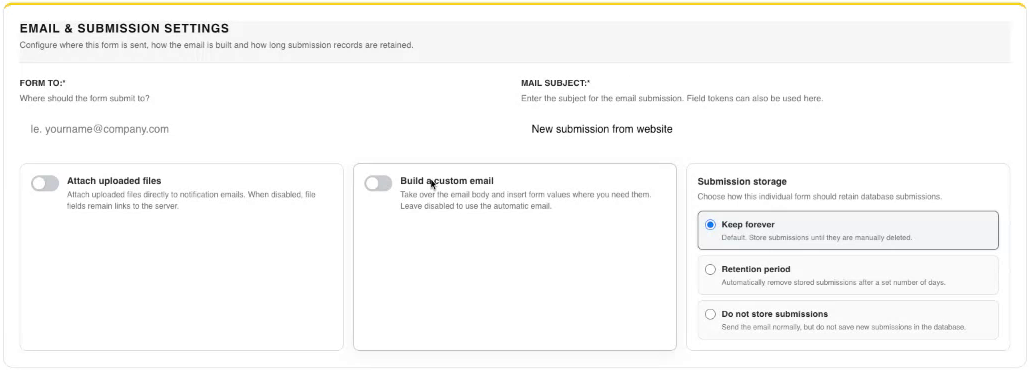
Email and submission storage settings. Select the image to view it at full size.
- Accessing CoreCMS
- Understanding the CoreCMS interface
- The administration sidebar
- Using the page builder
- Containers, rows and columns
- Adding and editing components
- Page-specific settings
- Saving and publishing changes
- Before you publish
- Desktop, tablet and mobile layouts
- Managing columns and alignment
- Saved Blocks and reusable layouts
- Buttons and linked content
- Page revisions and restoring content
- Duplicating a page
- Media Manager
- Plugins and modules
- Getting help with CoreCMS
- CoreCMS: start here
- CoreCMS Form Builder
- Website Analytics
- Managing website search
- DigiSEO: checking a page
- DigiAccess accessibility toolbar