
Creating plugin content | CoreCMS guides
Use plugin records for structured content such as news, events and projects. A module’s fields are designed for its own content type.
How to use it
- Open the module and choose Add new record.
- Complete its title and required fields.
- Add formatted content using the HTML editor where provided.
- Choose images and documents through the media picker.
- Set any categories, dates, related records and publication controls.
- Save, then check the listing and detail page.
Before you finish
CoreCMS provides the administration framework, but your module defines the available fields. Do not assume one client’s Projects or Awards module is installed on every website.
Related guides
- Plugins and modules
- Opening a plugin or module
- Finding and editing plugin records
- Removing a plugin record
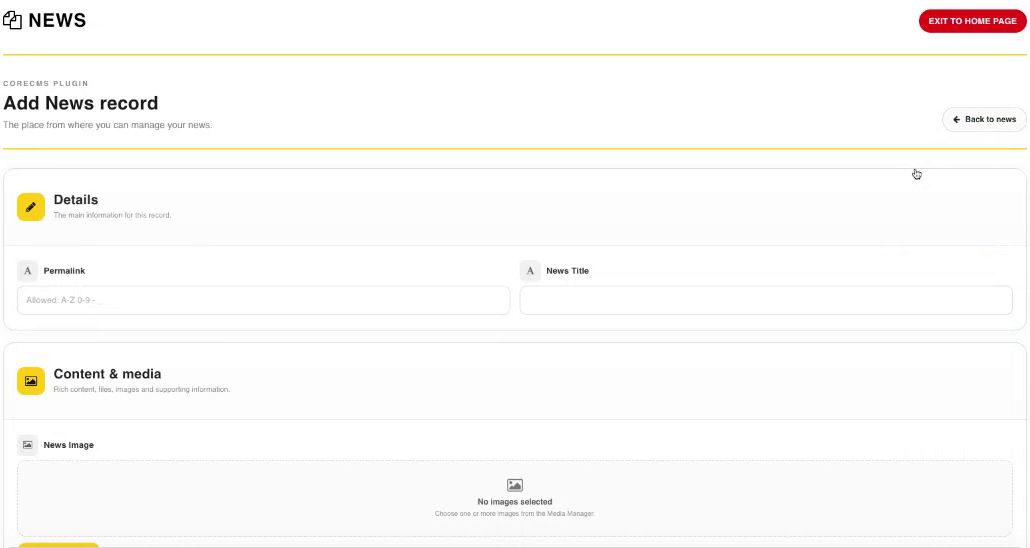
Adding a News record, an example of a CoreCMS plugin form. Select the image to view it at full size.
- Accessing CoreCMS
- Understanding the CoreCMS interface
- The administration sidebar
- Using the page builder
- Containers, rows and columns
- Adding and editing components
- Page-specific settings
- Saving and publishing changes
- Before you publish
- Desktop, tablet and mobile layouts
- Managing columns and alignment
- Saved Blocks and reusable layouts
- Buttons and linked content
- Page revisions and restoring content
- Duplicating a page
- Media Manager
- Plugins and modules
- Getting help with CoreCMS
- CoreCMS: start here
- CoreCMS Form Builder
- Website Analytics
- Managing website search
- DigiSEO: checking a page
- DigiAccess accessibility toolbar