
Reordering navigation items | CoreCMS guides
Drag navigation items into a clear order and hierarchy. Indentation controls whether an item appears beneath another item.
How to use it
- Open the required navigation.
- Drag the item to its new position.
- Check the indentation and any child items after moving it.
- Save the menu and open the public website.
- Test dropdowns and the mobile menu.
Before you finish
Use short, meaningful labels. A change in menu hierarchy does not necessarily change the page’s address or its content.
Related guides
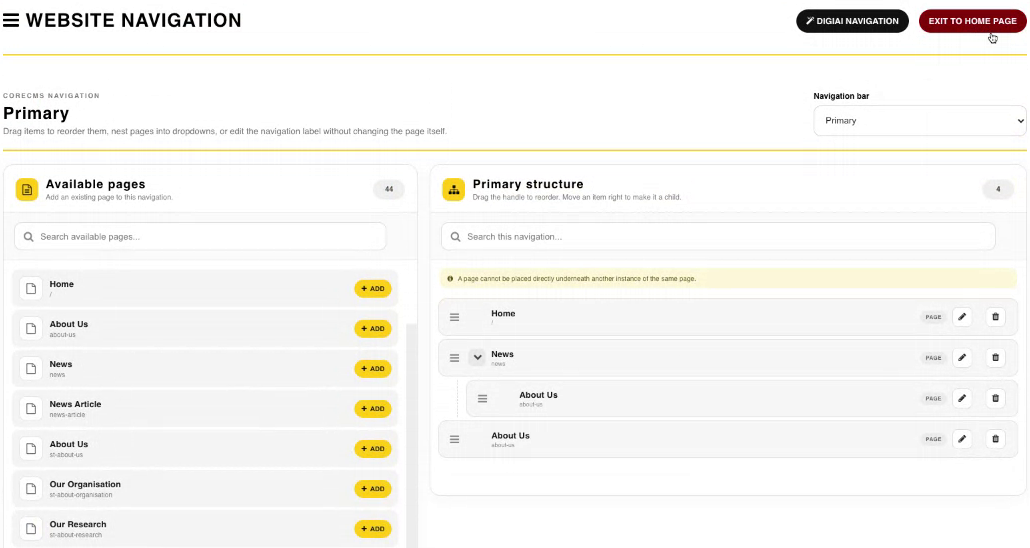
Website Navigation, available pages and the menu structure. Select the image to view it at full size.
- Accessing CoreCMS
- Understanding the CoreCMS interface
- The administration sidebar
- Using the page builder
- Containers, rows and columns
- Adding and editing components
- Page-specific settings
- Saving and publishing changes
- Before you publish
- Desktop, tablet and mobile layouts
- Managing columns and alignment
- Saved Blocks and reusable layouts
- Buttons and linked content
- Page revisions and restoring content
- Duplicating a page
- Media Manager
- Plugins and modules
- Getting help with CoreCMS
- CoreCMS: start here
- CoreCMS Form Builder
- Website Analytics
- Managing website search
- DigiSEO: checking a page
- DigiAccess accessibility toolbar