
Image titles, alternative text and captions | CoreCMS guides
Media metadata helps you describe uploaded assets. CoreCMS supports fields including title, alternative text, caption, description, keywords and a decorative-image flag.
How to use it
- Open Media Manager and select the image.
- Open its metadata controls.
- Enter a useful title and describe the image’s meaning in Alternative text.
- Use the decorative setting only when the image adds no information.
- Add a caption or description if needed and save.
- Check the image in the page or plugin where it is used.
Before you finish
A caption is visible text when the component displays it; alternative text supports people who cannot see the image. Some templates use their own values, so check the rendered result.
Related guides
- Finding folders and media
- Creating and managing media folders
- Uploading and managing files
- Resizing, cropping and rotating images
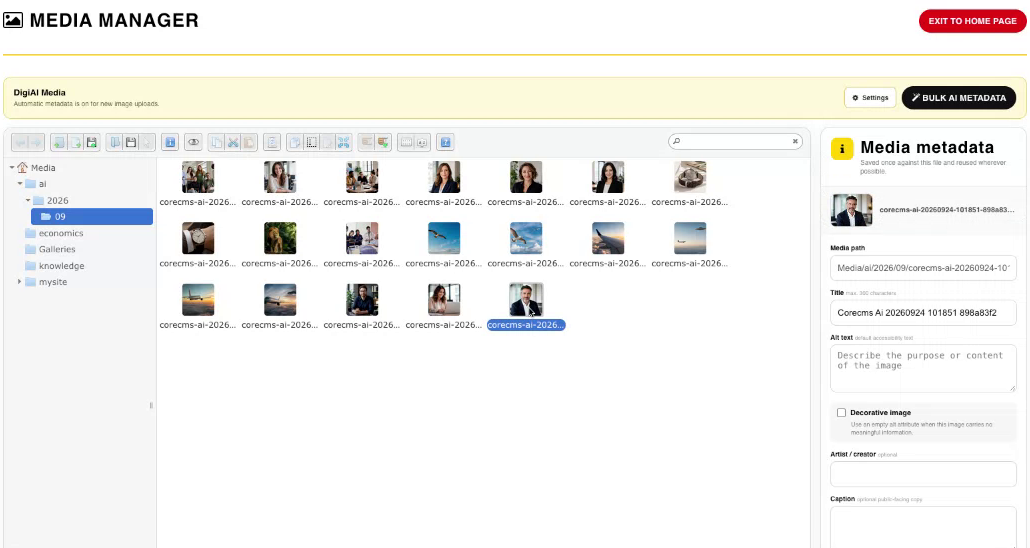
Media Manager, folders and image metadata. Select the image to view it at full size.
- Accessing CoreCMS
- Understanding the CoreCMS interface
- The administration sidebar
- Using the page builder
- Containers, rows and columns
- Adding and editing components
- Page-specific settings
- Saving and publishing changes
- Before you publish
- Desktop, tablet and mobile layouts
- Managing columns and alignment
- Saved Blocks and reusable layouts
- Buttons and linked content
- Page revisions and restoring content
- Duplicating a page
- Media Manager
- Plugins and modules
- Getting help with CoreCMS
- CoreCMS: start here
- CoreCMS Form Builder
- Website Analytics
- Managing website search
- DigiSEO: checking a page
- DigiAccess accessibility toolbar