
Headings, links and image checks | CoreCMS guides
DigiSEO helps identify issues in the content structure as well as the metadata. Review the actual page before deciding how to respond.
How to use it
- Check that the page has a clear main heading and logical subheadings.
- Read the opening paragraph and make the subject clear.
- Review internal and external links for relevance and useful wording.
- Review informative images for appropriate alternative text.
- Break up long paragraphs and simplify difficult sentences.
- Save and recheck the page.
Before you finish
Do not change a working URL just to improve a score without considering existing links and redirects. Automated checks cannot judge every aspect of content quality.
Related guides
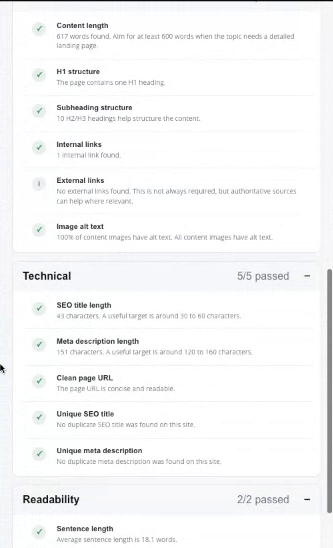
DigiSEO content, technical and readability checks. Select the image to view it at full size.
- Accessing CoreCMS
- Understanding the CoreCMS interface
- The administration sidebar
- Using the page builder
- Containers, rows and columns
- Adding and editing components
- Page-specific settings
- Saving and publishing changes
- Before you publish
- Desktop, tablet and mobile layouts
- Managing columns and alignment
- Saved Blocks and reusable layouts
- Buttons and linked content
- Page revisions and restoring content
- Duplicating a page
- Media Manager
- Plugins and modules
- Getting help with CoreCMS
- CoreCMS: start here
- CoreCMS Form Builder
- Website Analytics
- Managing website search
- DigiSEO: checking a page
- DigiAccess accessibility toolbar