
DigiChecker accessibility reviews | CoreCMS guides
DigiChecker highlights potential accessibility issues on a page and groups findings so you can review them. It is a checking tool, not a certificate of compliance.
How to use it
- Sign in with permission to use the website’s accessibility checking tools.
- Open DigiChecker from the available accessibility controls.
- Review grouped errors and warnings.
- Select a finding to highlight the affected element and inspect its details.
- Use any preview fix to understand the suggested change.
- Make the lasting correction in the page, component or theme and run the check again.
Before you finish
Check keyboard navigation, form labels, headings and screen-reader behaviour as well. A preview does not necessarily save a permanent website change.
Related guides
- DigiAccess accessibility toolbar
- Reading and display controls
- Speech and translation tools
- Configuring DigiAccess
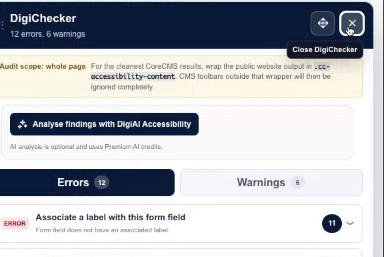
DigiChecker findings for the demonstration page. Select the image to view it at full size.
- Accessing CoreCMS
- Understanding the CoreCMS interface
- The administration sidebar
- Using the page builder
- Containers, rows and columns
- Adding and editing components
- Page-specific settings
- Saving and publishing changes
- Before you publish
- Desktop, tablet and mobile layouts
- Managing columns and alignment
- Saved Blocks and reusable layouts
- Buttons and linked content
- Page revisions and restoring content
- Duplicating a page
- Media Manager
- Plugins and modules
- Getting help with CoreCMS
- CoreCMS: start here
- CoreCMS Form Builder
- Website Analytics
- Managing website search
- DigiSEO: checking a page
- DigiAccess accessibility toolbar