
Analytics collection settings | CoreCMS guides
Analytics settings control what the website records. The interface includes tracking switches, click categories and visitor measurement options.
How to use it
- Open the Analytics settings tab.
- Check whether Website analytics is enabled.
- Review Respect Do Not Track and whether logged-in CoreCMS users should be tracked.
- Choose the internal, external, download, email and telephone clicks you need.
- Review query-string storage before enabling it.
- Save Analytics settings and check a permitted test visit.
Before you finish
Search analytics has its own switch in Site Search settings. Clearing analytics data is permanent. Keep internal editor activity excluded if you want reports to focus on public visits.
Related guides
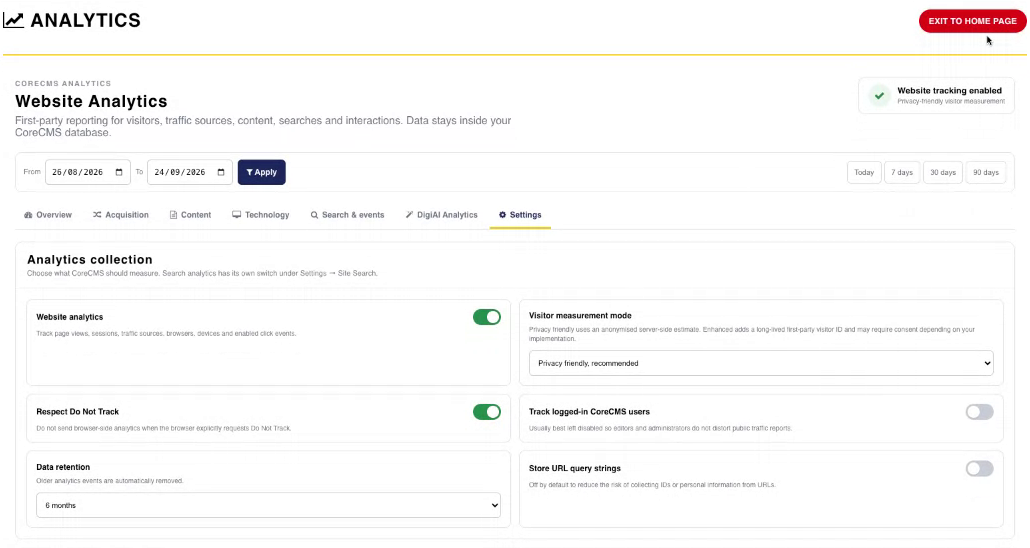
Analytics collection settings. Select the image to view it at full size.
- Accessing CoreCMS
- Understanding the CoreCMS interface
- The administration sidebar
- Using the page builder
- Containers, rows and columns
- Adding and editing components
- Page-specific settings
- Saving and publishing changes
- Before you publish
- Desktop, tablet and mobile layouts
- Managing columns and alignment
- Saved Blocks and reusable layouts
- Buttons and linked content
- Page revisions and restoring content
- Duplicating a page
- Media Manager
- Plugins and modules
- Getting help with CoreCMS
- CoreCMS: start here
- CoreCMS Form Builder
- Website Analytics
- Managing website search
- DigiSEO: checking a page
- DigiAccess accessibility toolbar