
CoreCMS: start here | CoreCMS guides
Use these guides to manage your website’s content, files, forms and reporting. They describe the current 3.9.x interface, checked against the supplied CoreCMS 3.9.27 source. Your installation may show fewer tools because of permissions or its enabled features.
How to use it
- Start with Accessing CoreCMS and Understanding the CoreCMS interface.
- Learn Website pages, the page builder and Website navigation for everyday editing.
- Use Media Manager for images and documents, and Plugins for structured records.
- Use Forms, Analytics, Site Search, DigiSEO and DigiAccess for the relevant website tasks.
- Check the publishing checklist before making a substantial update live.
Before you finish
If a control differs from this guide, check your installed version and contact Digitalogy with a screenshot. Older installations may need an update.
Related guides
- Accessing CoreCMS
- Signing in to CoreCMS
- Account security and access restrictions
- Understanding the CoreCMS interface
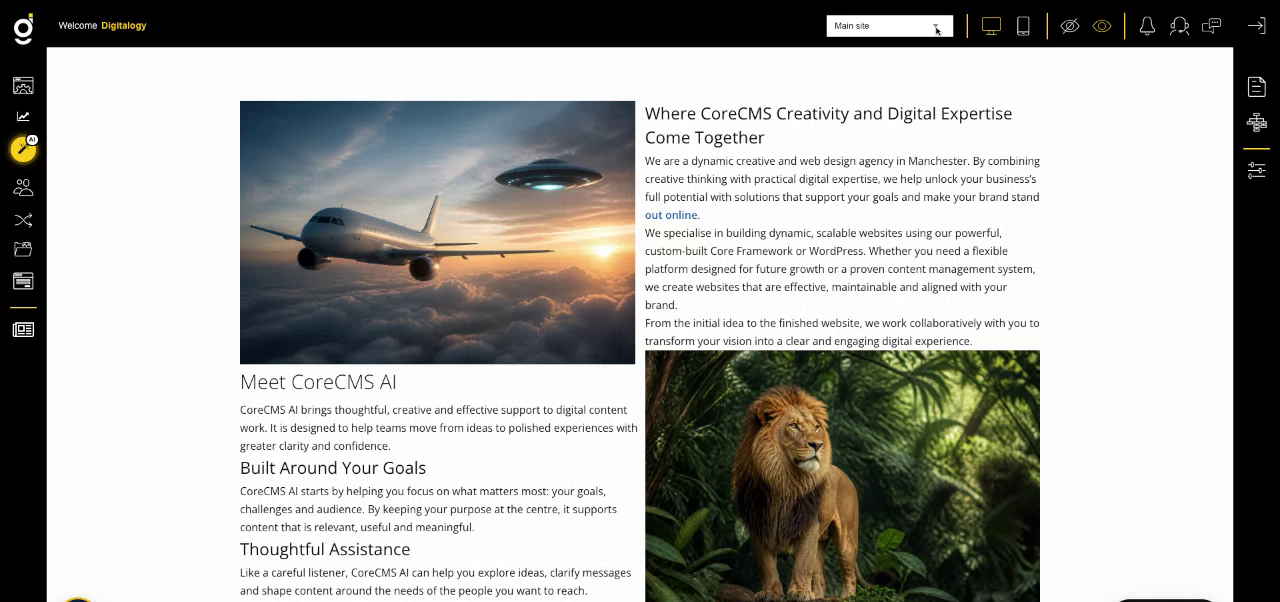
CoreCMS administration controls around the website. Select the image to view it at full size.
- Accessing CoreCMS
- Understanding the CoreCMS interface
- The administration sidebar
- Using the page builder
- Containers, rows and columns
- Adding and editing components
- Page-specific settings
- Saving and publishing changes
- Before you publish
- Desktop, tablet and mobile layouts
- Managing columns and alignment
- Saved Blocks and reusable layouts
- Buttons and linked content
- Page revisions and restoring content
- Duplicating a page
- Media Manager
- Plugins and modules
- Getting help with CoreCMS
- CoreCMS: start here
- CoreCMS Form Builder
- Website Analytics
- Managing website search
- DigiSEO: checking a page
- DigiAccess accessibility toolbar