
Submission storage and retention | CoreCMS guides
Each current-builder form has its own storage policy. Email delivery and storing a copy in the website database are separate choices.
How to use it
- Open the form’s Email & submission settings.
- Under Submission storage, choose Keep forever, Retention period or Do not store submissions.
- For a retention period, enter the required number of days within the available range.
- Save the form.
- Submit a test and confirm the expected email and storage behaviour.
Before you finish
Keep forever means records remain until deleted. Do not store submissions prevents new database copies; do not assume it removes existing records or email copies. The current builder enforces retention during relevant form-management and submission actions. Ask Digitalogy to confirm cleanup timing for your installation.
Related guides
- CoreCMS Form Builder
- Form fields and validation
- Conditional fields in forms
- Form notifications and custom emails
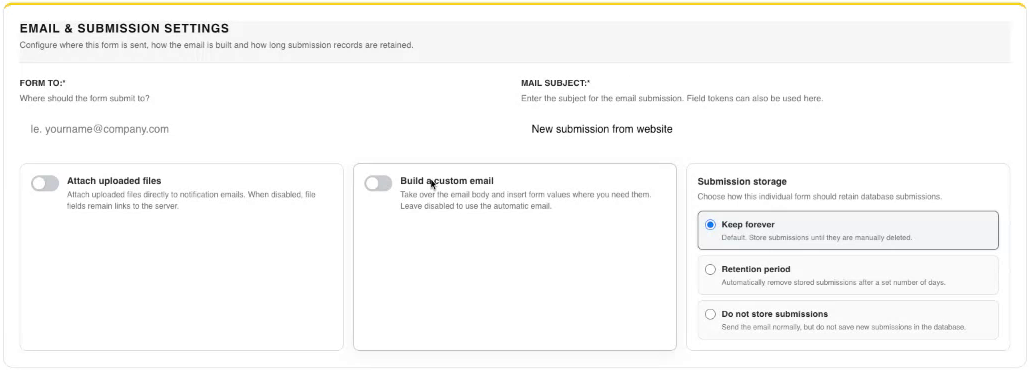
Email and submission storage settings. Select the image to view it at full size.
- Accessing CoreCMS
- Understanding the CoreCMS interface
- The administration sidebar
- Using the page builder
- Containers, rows and columns
- Adding and editing components
- Page-specific settings
- Saving and publishing changes
- Before you publish
- Desktop, tablet and mobile layouts
- Managing columns and alignment
- Saved Blocks and reusable layouts
- Buttons and linked content
- Page revisions and restoring content
- Duplicating a page
- Media Manager
- Plugins and modules
- Getting help with CoreCMS
- CoreCMS: start here
- CoreCMS Form Builder
- Website Analytics
- Managing website search
- DigiSEO: checking a page
- DigiAccess accessibility toolbar