
DigiSEO: checking a page | CoreCMS guides
DigiSEO checks the page’s content and metadata and shows an on-page score with findings. Its standard checks do not require an AI subscription.
How to use it
- Open the page editor or page settings and select DigiSEO.
- Set a focus keyphrase that reflects the page’s main subject.
- Review the Basic SEO, Content, Technical and Readability findings.
- Update the page title, description, headings, links or image alternatives where appropriate.
- Save the page and run the review again.
Before you finish
The score is an editing aid, not a search-ranking guarantee. Use judgement: a short contact page does not need extra text simply to reach a length target.
Related guides
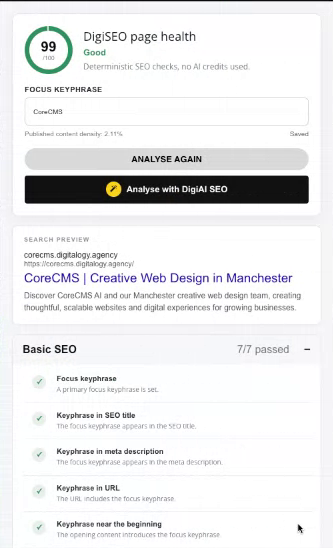
DigiSEO page health, focus keyphrase and search preview. Select the image to view it at full size.
- Accessing CoreCMS
- Understanding the CoreCMS interface
- The administration sidebar
- Using the page builder
- Containers, rows and columns
- Adding and editing components
- Page-specific settings
- Saving and publishing changes
- Before you publish
- Desktop, tablet and mobile layouts
- Managing columns and alignment
- Saved Blocks and reusable layouts
- Buttons and linked content
- Page revisions and restoring content
- Duplicating a page
- Media Manager
- Plugins and modules
- Getting help with CoreCMS
- CoreCMS: start here
- CoreCMS Form Builder
- Website Analytics
- Managing website search
- DigiSEO: checking a page
- DigiAccess accessibility toolbar