
Editing a text block | CoreCMS guides
Text blocks provide a rich text editor for headings, paragraphs, lists and links.
How to use it
- Select the text component and click inside its editable area.
- Type or paste the content, removing unwanted formatting from copied text.
- Apply heading levels in a logical order.
- Use the link control to add descriptive links and check their destinations.
- Review spelling, spacing and mobile readability.
- Save the page.
Before you finish
Use headings for structure, rather than simply making paragraphs larger. Avoid using spaces or repeated line breaks to create columns. The editor’s full-screen option can help with longer content.
Related guides
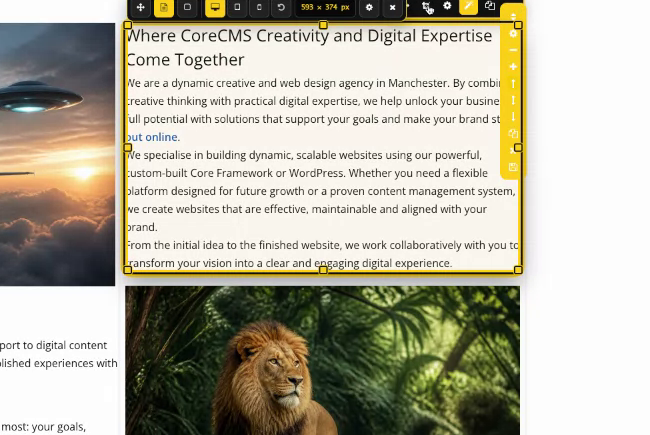
A selected text component and its editing toolbar. Select the image to view it at full size.
- Accessing CoreCMS
- Understanding the CoreCMS interface
- The administration sidebar
- Using the page builder
- Containers, rows and columns
- Adding and editing components
- Page-specific settings
- Saving and publishing changes
- Before you publish
- Desktop, tablet and mobile layouts
- Managing columns and alignment
- Saved Blocks and reusable layouts
- Buttons and linked content
- Page revisions and restoring content
- Duplicating a page
- Media Manager
- Plugins and modules
- Getting help with CoreCMS
- CoreCMS: start here
- CoreCMS Form Builder
- Website Analytics
- Managing website search
- DigiSEO: checking a page
- DigiAccess accessibility toolbar